When running VideoSyncPro in a Master/Slave setup, the sources recorded by the slave(s) must be configured in Szenario(s) just like for a regular recording station.
Scenario Configuration
To ensure that automated control* between Master and Slave workstations works optimally, the Scenario names on Master and Slave should match. The content per scenario (the sources) differs of course between Masters and Slaves.
To tell them apart, the names on the slave(s) should start with the original scenario name maybe followed by an add on to identify the slave system, using the following syntax:
<My Master Scenario Name>_<ComputerIDSlave>
Note: The first part of the name, before the underscore, must be identical to the name used on the Master. This ensures that the correct scenario can be opened automatically on the Slave computer(s), the moment a new recording is created on the Master.
For example: If on the Master, a scenario is called 'Standard', the corresponding scenario on the first slave should be named something like 'Standard_Slave01' or 'Standard_2'. If there is a second slave, name the corresponding scenario something like 'Standard_Slave02' or 'Standard_3'
Automated Replay
On opening a recorded session on the Master, will automatically open the corresponding recording on the Slave(s).
This automated search for the corresponding recording each Slave is based on the <master scenario name> + recording time*.
For this to work, it is important that time format, region and current time are identical.
Scenario Settings
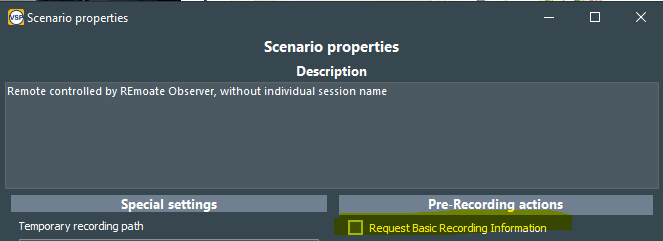
Per default, for each recording, a dialog appears to name your recording.
Whether this dialog appears or not, is specified in the Scenario Properties for each scenario individually.
For master-Slave recordings, diable this option unless you want to enter a custom name on both computers at the start of each recording:
*) This feature is available since VideoSyncPro Studio 4.12.15 or up. In earlier versions, the required scenario or recording must be opened manually on each Slave-computer.